
Myths about teaching can hold you back
Learn why


These resources will be removed by the end of the Spring Term 2026.
Start using our brand new teaching resources now. Designed by teachers and subject experts, with real classrooms in mind.
The older resources below were created for lockdown learning during the pandemic and are not designed for classroom teaching.
Lesson details
Key learning points
- In this lesson, we will develop a guess the number game that can be played on the micro:bit. The game will utilise gestures for input, and it will utilise sound and light for output.

Content guidance
- Contains external content.

Supervision
Adult supervision recommended

Licence
This content is made available by Oak National Academy Limited and its partners and licensed under Oak’s terms & conditions (Collection 1), except where otherwise stated.
Loading...
3 Questions
Q1.What is missing from this line of code: *.play(music.FUNK)
What is missing from this line of code: *.play(music.FUNK)
micro:bit

show
tune
Q2.What is wrong with this line of code: display.clear()
What is wrong with this line of code: display.clear()
display and clear should start with a capital letter
display should have a capital D
the brackets are not needed
Q3.Which line of code would light up the LED circled below?
Which line of code would light up the LED circled below?
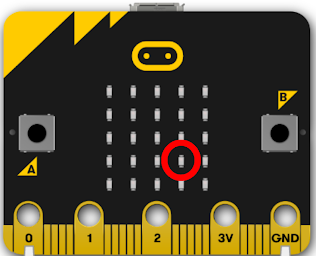
display.set_pixel(3,4,9)
display.set_pixel(4,3,9)
display.set_pixel(4,4,9)
3 Questions
Q1.When decomposing a problem, what are the smaller programs called
When decomposing a problem, what are the smaller programs called
Activities
Functions
Tasks
Q2.What name is given to the input of tilting or shaking the micro:bit?
What name is given to the input of tilting or shaking the micro:bit?
Choices
Inputs
Q3.What other types of project could you make with the micro:bit?
What other types of project could you make with the micro:bit?
Fastest finger
Magic 8 ball
Password checker