


Graphic designs


Lesson details
Learning outcome
I can choose and use communication techniques that are appropriate to showcase a product.
Key learning points
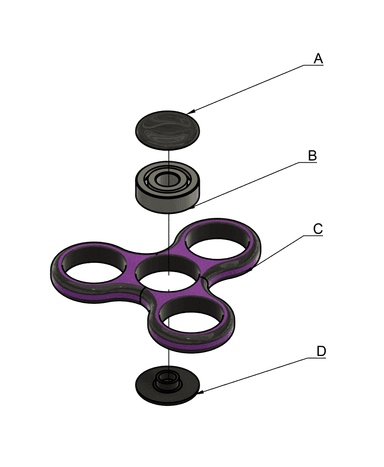
- Exploded diagrams show how a product can be assembled and how the separate parts fit together.
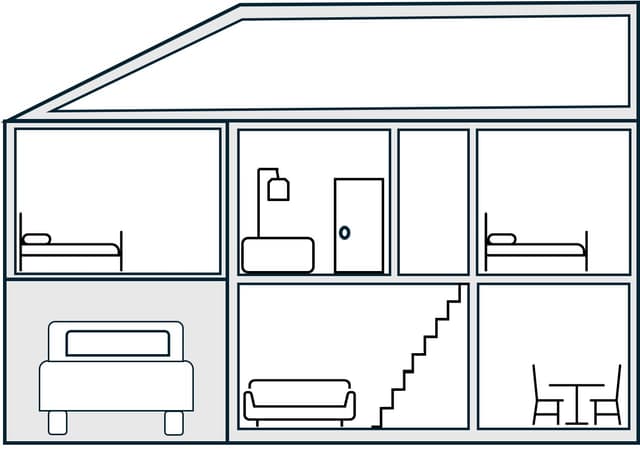
- Cross-section diagrams shows the inside of something.
- Isometric diagrams are usually at 30 degree angles.
- Bricks can be drawn on isometric paper with a ruler.
Keywords
Diagram - a simplified drawing showing information
Cross-section - an inside view of a 3D object when cut across a plane
Isometric - showing three dimesions, to scale
Angle - the direction from which you look at something
Common misconception
All design drawings are drawn from one angle, usually a front view.
Isometric drawings show three angles at the same time.
Teacher tip
Thirty degree isometric paper works best for this lesson. Allow pupils to try different types of isometric paper, grid and dot. Model the different techniques used in the lesson.

Equipment
Isometric paper (dot and grid), rulers, pencils, plastic building bricks.

Licence

Lesson video
Loading...
Prior knowledge starter quiz
6 Questions
Q1.What did Ole Kirk Kristiansen began his career as?

Q2.When was the Lego brick we know today patented?
Q3.What term is more scientifically accurate when talking about materials.
Q4.Polymers can be reformed using moulding to create complex products.
Q5.What would be a quick way to communicate a design idea to someone else?
Q6.What does horizontal mean?
Assessment exit quiz
6 Questions
Q1.A cross-section is the view of an object that can not be seen from the outside.

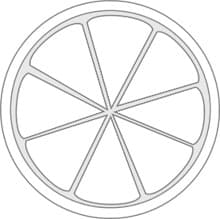
Q2.Which plane has this tomato been cut through?

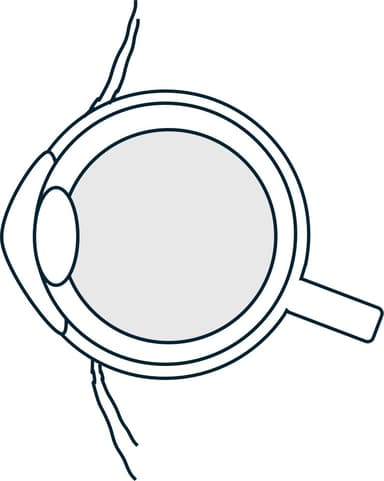
Q3.Which of these images is showing the cross-sectional view of an eye?
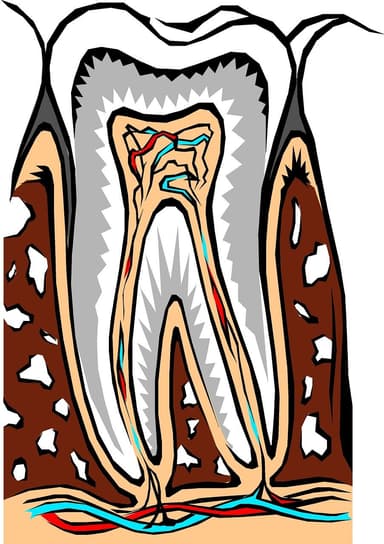
Q4.What type of diagram is this image showing?
Q5.Isometric diagrams show 3D objects to scale, with shape sides drawn at __________ degree angles from the horizontal.
Q6.How many dimensions are shown in an isometric diagram?
To help you plan your 6 design and technology lesson on: Graphic designs, download all teaching resources for free and adapt to suit your pupils' needs...
To help you plan your 6 design and technology lesson on: Graphic designs, download all teaching resources for free and adapt to suit your pupils' needs.
The starter quiz will activate and check your pupils' prior knowledge, with versions available both with and without answers in PDF format.
We use learning cycles to break down learning into key concepts or ideas linked to the learning outcome. Each learning cycle features explanations with checks for understanding and practice tasks with feedback. All of this is found in our slide decks, ready for you to download and edit. The practice tasks are also available as printable worksheets and some lessons have additional materials with extra material you might need for teaching the lesson.
The assessment exit quiz will test your pupils' understanding of the key learning points.
Our video is a tool for planning, showing how other teachers might teach the lesson, offering helpful tips, modelled explanations and inspiration for your own delivery in the classroom. Plus, you can set it as homework or revision for pupils and keep their learning on track by sharing an online pupil version of this lesson.
Explore more key stage 2 design and technology lessons from the Products and people: inspirational design unit, dive into the full primary design and technology curriculum, or learn more about lesson planning.