


Lesson 1 of 6


These resources will be removed by the end of the Spring Term 2026.
Start using our brand new teaching resources now. Designed by teachers and subject experts, with real classrooms in mind.
The older resources below were created for lockdown learning during the pandemic and are not designed for classroom teaching.
Lesson details
Key learning points
- In this lesson, we will introduce the concept of spreadsheets and why spreadsheets are useful. We will learn how to navigate a spreadsheet via its rows and columns, and become familiar with the cell referencing system.

Licence
This content is made available by Oak National Academy Limited and its partners and licensed under Oak’s terms & conditions (Collection 1), except where otherwise stated.
Loading...
3 Questions
Q1.Can you name the range of cells in this image?
Can you name the range of cells in this image?
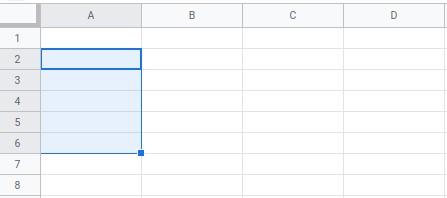
A1:A7

A6:A3
Q2.Can you name the range of cells in this image?
Can you name the range of cells in this image?
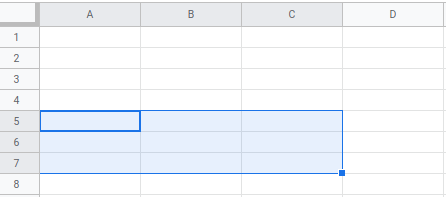
A4:C8
B5:C7
C7:A5
Q3.What is selected in the image?
What is selected in the image?
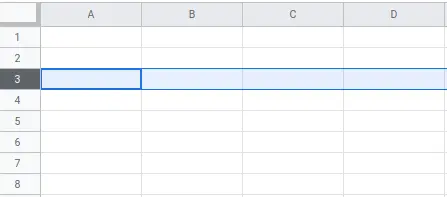
Cell
Column