


Museum alarm programming and fault finding


Lesson details
Learning outcome
I can program a micro:bit alarm system and test faults in a circuit.
Key learning points
- Micro:bit alarm systems can be programmed in many ways using Tinkercad.
- When testing circuits, one component should be tested at a time.
- There can be many reasons why a circuit does not work.
- Electrical components must have the correct current flow.
Keywords
Millisecond - one thousandth of a second
Accelerometer - a device that measures how quickly something is speeding up or slowing down
Fault finding - testing electrical equipment to check whether it's working safely and correctly
Logical - thinking in steps, using what you already know, and coming up with sensible solutions
Common misconception
Connected circuits will always work.
Circuits need to be checked that the connections are accurate and the components all work.
Teacher tip
Set up a circuit on each table that doesn't work for different reasons for pupils to explore and decide the reasons for them not working, have wires cut and stripped ready to be used instead of crocodile clips.

Equipment
Wire, wire strippers, micro:bit components, electrical tape, switches

Content guidance
Risk assessment required - equipment

Supervision
Adult supervision required

Licence

Lesson video
Loading...
Prior knowledge starter quiz
6 Questions
Q1.Which of these is used to measure how bright it is?
Q2.What does a magnetometer in a micro:bit do?
Q3.What does LED stand for?
Q4.Which of these is an input on a micro:bit?
Q5.Match the word to the definition.

Q6.Put these steps for how a museum alarm can work in the correct order.
Assessment exit quiz
4 Questions
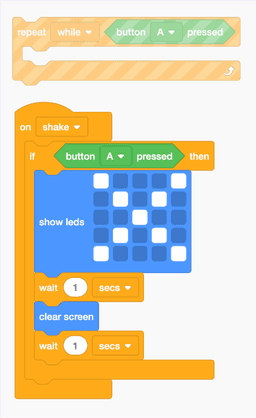
Q1.Which code should be replaced by repeat code to make the accelerometer code work?
Q2.What type of file is downloaded onto the micro:bit?
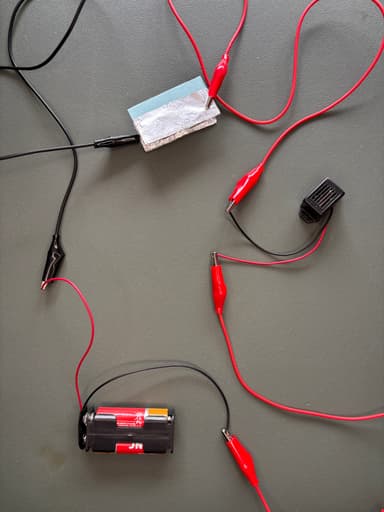
Q3.What could be the fault in this circuit?
Q4.What does it mean to fault find logically?
To help you plan your 6 design and technology lesson on: Museum alarm programming and fault finding, download all teaching resources for free and adapt to suit your pupils' needs...
To help you plan your 6 design and technology lesson on: Museum alarm programming and fault finding, download all teaching resources for free and adapt to suit your pupils' needs.
The starter quiz will activate and check your pupils' prior knowledge, with versions available both with and without answers in PDF format.
We use learning cycles to break down learning into key concepts or ideas linked to the learning outcome. Each learning cycle features explanations with checks for understanding and practice tasks with feedback. All of this is found in our slide decks, ready for you to download and edit. The practice tasks are also available as printable worksheets and some lessons have additional materials with extra material you might need for teaching the lesson.
The assessment exit quiz will test your pupils' understanding of the key learning points.
Our video is a tool for planning, showing how other teachers might teach the lesson, offering helpful tips, modelled explanations and inspiration for your own delivery in the classroom. Plus, you can set it as homework or revision for pupils and keep their learning on track by sharing an online pupil version of this lesson.
Explore more key stage 2 design and technology lessons from the Systems and control: sensor alarms unit, dive into the full primary design and technology curriculum, or learn more about lesson planning.