


Model accessible controllers


Lesson details
Learning outcome
I can create prototypes using cardboard and foam modelling techniques.
Key learning points
- Modelling is essential to test designs, gain feedback and improve products before manufacturing.
- Understanding user needs and wants is critical to designing effective and accessible products.
- Templates are used to save time, ensure consistency and improve the quality of prototypes.
- Prototyping methods, like foam and cardboard modelling, help refine the product’s size, shape and function.
Keywords
Modelling - the process of creating physical or digital representations of design ideas to visualise and test them
Template - a pattern or guide used for consistency when modelling
User - who you are designing for
Ideate - to think of or create lots of ideas
Prototype - a simple, low-cost model made to check size, shape and function
Common misconception
User needs and wants are the same thing.
Needs are the essential features required for the product to function, while wants are additional features that aren't necessary but would enhance the product if included.
Teacher tip
Remind pupils of the various modelling techniques and allow them to select the most suitable for their prototype.

Equipment
Cardboard and foam modelling tools and equipment.

Licence

Lesson video
Loading...
Prior knowledge starter quiz
6 Questions
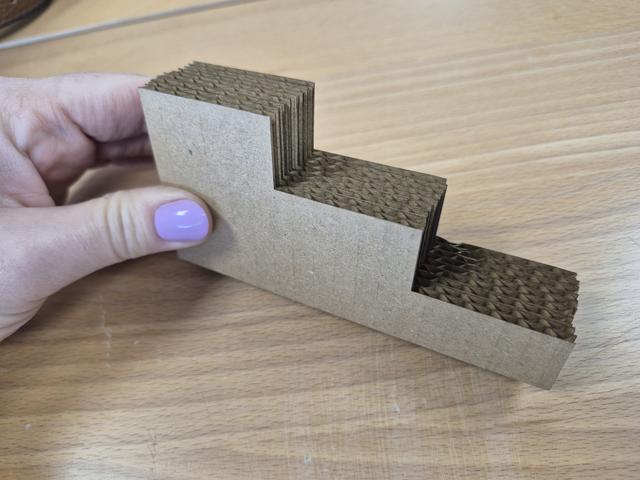
Q1.Which modelling technique is this image showing?

Q2.Put these stages of creating a curved join between two pieces of corrugated cardboard in order.
Q3.Select the liquid adhesive used for bonding paper, cardboard and wood.
Q4.What is fluting?
Q5.What are the advantages of using hot melt adhesive used with a hot glue gun?
Q6.What is the correct definition for 'user'?
Assessment exit quiz
4 Questions
Q1.Put these stages of product development is order.
Q2.Ideate is to generate many .
Q3.What is the purpose of modelling when designing a new product?
Q4.Understanding user needs and is critical to designing effective and accessible products.
To help you plan your 8 design and technology lesson on: Model accessible controllers, download all teaching resources for free and adapt to suit your pupils' needs...
To help you plan your 8 design and technology lesson on: Model accessible controllers, download all teaching resources for free and adapt to suit your pupils' needs.
The starter quiz will activate and check your pupils' prior knowledge, with versions available both with and without answers in PDF format.
We use learning cycles to break down learning into key concepts or ideas linked to the learning outcome. Each learning cycle features explanations with checks for understanding and practice tasks with feedback. All of this is found in our slide decks, ready for you to download and edit. The practice tasks are also available as printable worksheets and some lessons have additional materials with extra material you might need for teaching the lesson.
The assessment exit quiz will test your pupils' understanding of the key learning points.
Our video is a tool for planning, showing how other teachers might teach the lesson, offering helpful tips, modelled explanations and inspiration for your own delivery in the classroom. Plus, you can set it as homework or revision for pupils and keep their learning on track by sharing an online pupil version of this lesson.
Explore more key stage 3 design and technology lessons from the Ergonomic design: accessible controllers unit, dive into the full secondary design and technology curriculum, or learn more about lesson planning.