


Code and simulate Micro:bits in Tinkercad


Lesson details
Learning outcome
I can develop a light sequence control system, and test and iterate it.
Key learning points
- Micro:bits are small computers which are are programmed using codes and blocks.
- Light sequences and loops can be used to develop control systems further.
- Control systems can be simulated within Tinkercad and also in the physical world.
Keywords
Program - sequence of instructions that can be used to control electrical components
Sensor - a device that can detect and monitor changes
Simulate - to imitate a product or process to test it
Common misconception
A light dependant resistor (LDR) only senses light levels.
An LDR's resistance changes depending on the amount of light it is exposed to. As the light level increases, the resistance decreases. This change in resistance can create a voltage change, which can be used as a signal to control an output.
Teacher tip
Ensure that your micro:bit has been updated to allow easy download of code in Tinkercad.

Equipment
Computers with access to Tinkercad, micro:bits, download cables, battery packs, LEDs with crocodile cables.

Licence

Lesson video
Loading...
Prior knowledge starter quiz
6 Questions
Q1.Which are input components?

Q2.An LDR is a sensing component that changes it's resistance depending on what?
Q3.A micro:bit is an example of a microcontroller. Microcontrollers are small .
Q4.What is this output component?

Q5.Explain why an LED needs a resistor in series with it?
Q6.Tinkercad uses __________ to code programs.
Assessment exit quiz
4 Questions
Q1.Which sensors are built into the micro:bit?
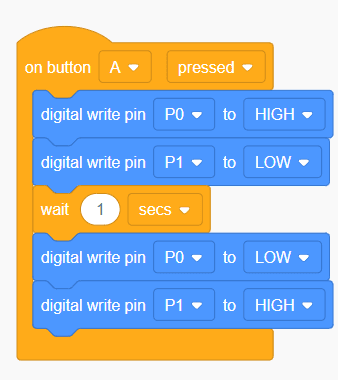
Q2.Put the descriptions in the correct order for the program.
Q3.A loop in a computer program executes the same code a set amount of times.
Q4.Why do we simulate programable systems before we download to a real world system?
To help you plan your 9 design and technology lesson on: Code and simulate Micro:bits in Tinkercad, download all teaching resources for free and adapt to suit your pupils' needs...
To help you plan your 9 design and technology lesson on: Code and simulate Micro:bits in Tinkercad, download all teaching resources for free and adapt to suit your pupils' needs.
The starter quiz will activate and check your pupils' prior knowledge, with versions available both with and without answers in PDF format.
We use learning cycles to break down learning into key concepts or ideas linked to the learning outcome. Each learning cycle features explanations with checks for understanding and practice tasks with feedback. All of this is found in our slide decks, ready for you to download and edit. The practice tasks are also available as printable worksheets and some lessons have additional materials with extra material you might need for teaching the lesson.
The assessment exit quiz will test your pupils' understanding of the key learning points.
Our video is a tool for planning, showing how other teachers might teach the lesson, offering helpful tips, modelled explanations and inspiration for your own delivery in the classroom. Plus, you can set it as homework or revision for pupils and keep their learning on track by sharing an online pupil version of this lesson.
Explore more key stage 3 design and technology lessons from the Functional prototypes: wearable technology unit, dive into the full secondary design and technology curriculum, or learn more about lesson planning.