
Myths about teaching can hold you back
Learn why


These resources will be removed by the end of the Spring Term 2026.
Start using our brand new teaching resources now. Designed by teachers and subject experts, with real classrooms in mind.
The older resources below were created for lockdown learning during the pandemic and are not designed for classroom teaching.
Lesson details
Key learning points
- In this lesson, we will use selection to control the outcomes in an interactive quiz. We will outline the requirements of the task and use an algorithm to show how we can use selection. To do this, we will design a storyboard to identify the questions asked and the outcomes for both correct and incorrect answers.

Licence
This content is made available by Oak National Academy Limited and its partners and licensed under Oak’s terms & conditions (Collection 1), except where otherwise stated.
Loading...
3 Questions
Q1.Which actions will take place if the user answers correctly?
Which actions will take place if the user answers correctly?
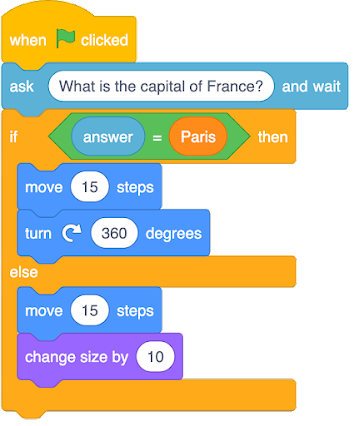
Move 15 steps and change colour
Move 15 steps and change size by 10

Move 25 steps and change colour
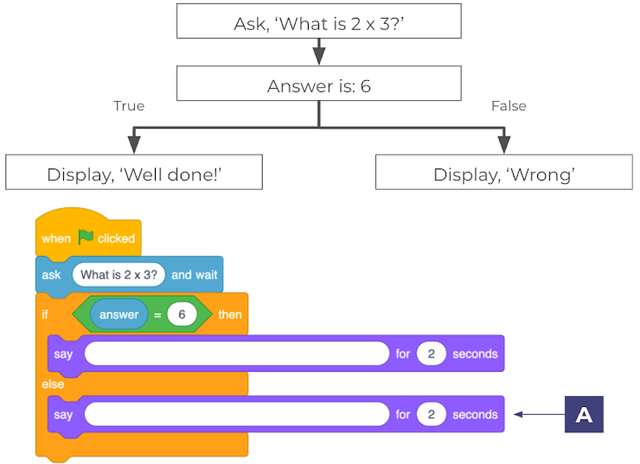
Q2.Follow the algorithm. Which phrase will be included in the program for 'say' block 'A'?
Follow the algorithm. Which phrase will be included in the program for 'say' block 'A'?
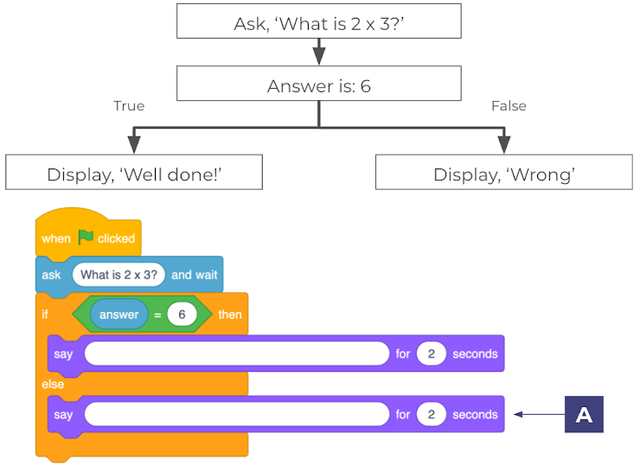
6
Well done!
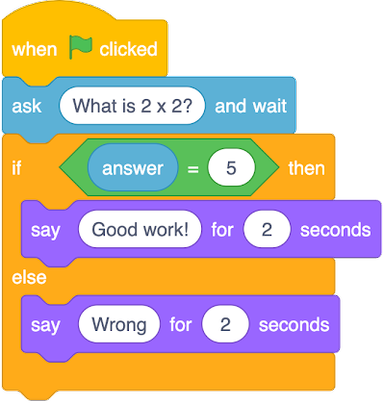
Q3.Which user answers would make the program display 'Wrong'?
Which user answers would make the program display 'Wrong'?
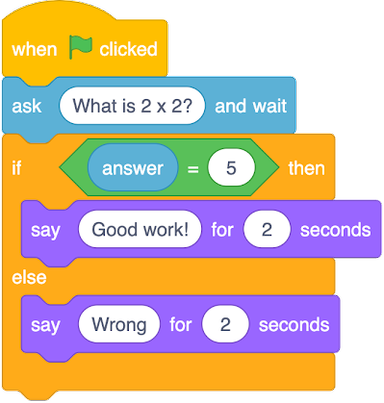
5
3 Questions
Q1.Which actions will take place if the user answers correctly?
Which actions will take place if the user answers correctly?
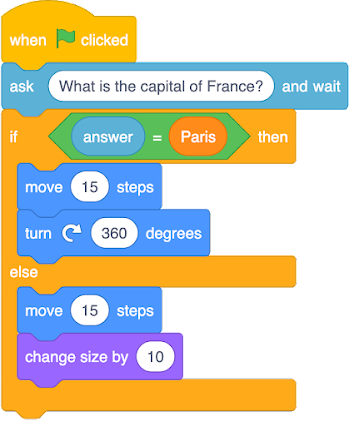
Move 15 steps and change colour
Move 15 steps and change size by 10
Move 25 steps and change colour
Q2.Follow the algorithm. Which phrase will be included in the program for 'say' block 'A'?
Follow the algorithm. Which phrase will be included in the program for 'say' block 'A'?
6
Well done!
Q3.Which user answers would make the program display 'Wrong'?
Which user answers would make the program display 'Wrong'?
5