


New
New
Lesson 3 of 8
Modelling and assembling complex shapes in Tinkercad
I can model and assemble complex shapes in Tinkercad.

Lesson 3 of 8
New
New
Modelling and assembling complex shapes in Tinkercad
I can model and assemble complex shapes in Tinkercad.
Lesson details
Key learning points
- You can use Group, Ungroup, Align, and Duplicate tools to build complex shapes in Tinkercad.
- The Scribble and Sketch tools are used to create and edit custom shapes.
- Robots are machines that can do tasks; they can sense, think, and act.
- Robots are often used for repetitive, hard or dangerous jobs.
Keywords
Group - join two or more shapes together to make one shape
Sketch - a drawing made up of straight or curved lines
Robot - a machine that can sense, think, and do tasks with some autonomy
Duplicate - make a copy of a shape and repeat its movement
Common misconception
Robots will take all human jobs in the future.
Robots can sometimes replace people in certain jobs, especially when the work is dangerous, boring, or very hard for humans to do. People will still be needed to design, build and program robots.
Give pupils time to develop their sketching skills in Tinkercad.

Teacher tip

Equipment
Computers/laptops, mice, access to Tinkercad.

Licence
This content is © Oak National Academy Limited (2025), licensed on Open Government Licence version 3.0 except where otherwise stated. See Oak's terms & conditions (Collection 2).
Lesson video
Loading...
Prior knowledge starter quiz
Download quiz pdf
6 Questions
Q1.In Tinkercad, what is seen on the screen and is interacted with by using the mouse and keyboard?
In Tinkercad, what is seen on the screen and is interacted with by using the mouse and keyboard?
workplane
work area
work base
Q2.Match the mouse button with the Tinkercad function.
Match the mouse button with the Tinkercad function.

used to select and move objects
used to orbit
used to zoom in and out
used to pan
Q3.What are the white squares that appear around a shape when it is selected called?
What are the white squares that appear around a shape when it is selected called?
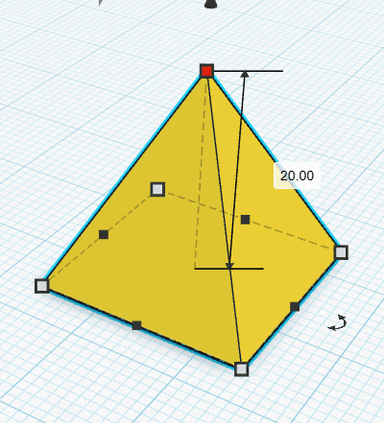
Q4.What happens when you click and drag the black cone above a shape?
What happens when you click and drag the black cone above a shape?
the shape gets taller
the shape rotates
the shape becomes a hole
Q5.What appears if you click the rotation handles that appear around a shape when selected?
What appears if you click the rotation handles that appear around a shape when selected?
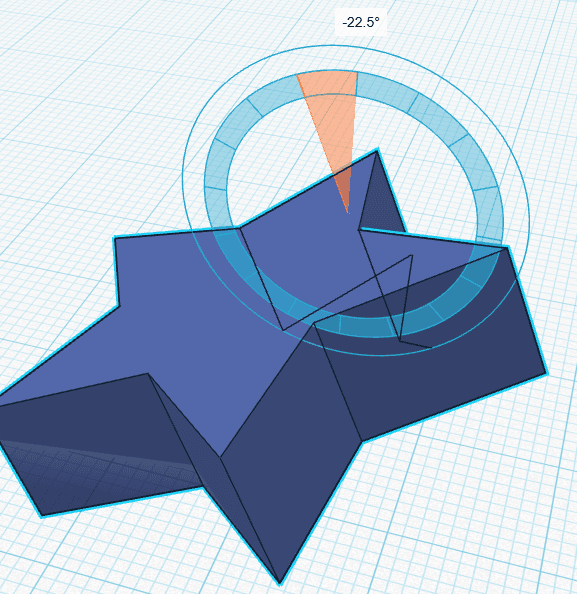
a ruler
a new workplane
axis labels
Q6.What are the axes called that shapes are rotated around in Tinkercad?
What are the axes called that shapes are rotated around in Tinkercad?
a, b and c
1, 2 and 3
length, width and height
Q3 Tinkercad/Autodesk screen shots reprinted courtesy of Autodesk, Inc. Q5 Tinkercad/Autodesk screen shots reprinted courtesy of Autodesk, Inc.
Assessment exit quiz
Download quiz pdf
6 Questions
Q1.To combine shapes in Tinkercad we use ...
To combine shapes in Tinkercad we use ...
join.
merge.
mate.
Q2.To line up shapes accurately in Tinkercad, which tool is used?
To line up shapes accurately in Tinkercad, which tool is used?
line up
duplicate
meaasure
Q3.What is a bevel?
What is a bevel?
a round edge
a type of hole
a multicoloured shape
Q4.What does the scribble tool allow users to do?
What does the scribble tool allow users to do?
create accurate shapes
create multicoloured shapes
create grouped shapes
Q5.Identify the characteristics of a robot
Identify the characteristics of a robot
walk
learn
Q6.Why do the military use robots for explosive removal?
Why do the military use robots for explosive removal?
they are better at it than humans
they can't be damaged