Choose exam board for KS4 Computer Science (GCSE)
Choose exam board for KS4 English
Choose exam board for KS4 French
Choose exam board for KS4 Geography
Choose exam board for KS4 German
Choose exam board for KS4 History
Choose tier for KS4 Maths
Choose exam board for KS4 Music
Choose exam board for KS4 Physical education (GCSE)
Choose exam board for KS4 Religious education (GCSE)
Choose exam board for KS4 Spanish

      Lesson details

      Learning outcome

      I can identify that commands have an outcome.

      Key learning points

      1. The motion code blocks add movement to a sprite.
      2. Multiple sprites can be controlled with separate movement commands.
      3. The stage provides a backdrop for sprites when they carry out commands.
      4. Random position motion blocks add unpredictability to commands.

      Keywords

      • Motion - the movement of an object over time

      • Stage - the background of a project

      • Random - cannot be predicted

      Common misconception

      Some pupils may think that a code block applies to all the sprites in a project.

      Multiple sprites can be controlled using separate commands and they each need their own code blocks to control them.

      Teacher tip

      Pupils can often get confused between the sprite and stage and wonder why specific code blocks are not showing. Remind pupils to select the component they are working on (either the sprite or stage) before they select the code blocks.

      Equipment

      Pupils will need access to a device with block-based programming software. Examples in this lesson use Scratch https://oak.link/scratch

      Licence

      This content is © Oak National Academy Limited (2026), licensed on Open Government Licence version 3.0
      except where otherwise stated. See Oak's terms & conditions
      (Collection 2).

      Lesson video

      Loading...

      Prior knowledge starter quiz

      6 Questions

      Q1.
      Which icon would you press to add a sprite to a project?

      An image in a quiz
      Correct Answer: An image in a quiz
      An image in a quiz
      An image in a quiz

      Q2.
      Which type of blocks are used to make a sprite move?

      Correct answer: motion
      events
      operators
      looks

      Q3.
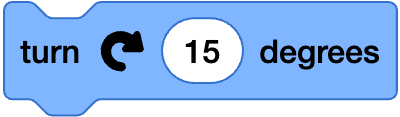
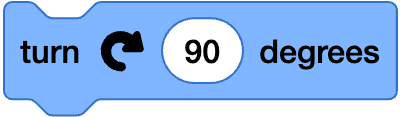
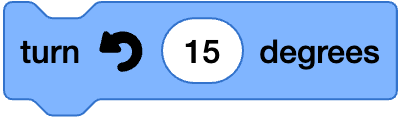
      Which code block would turn a sprite clockwise 15 degrees?
      An image in a quiz
      Correct Answer: An image in a quiz
      An image in a quiz

      Q4.
      The __________ of a sprite changes what it looks like.

      Correct answer: costume
      motion
      backdrop

      Q5.
      Pick all of the features of a sprite which can be changed.

      Correct answer: code
      Correct answer: costumes
      Correct answer: sounds
      backdrop

      Q6.
      In which section of the screen in Scratch can you see what your project looks like?

      Correct answer: stage
      blocks
      code area
      Q1 image 1 Scratch is a project of the Scratch Foundation. It is available for free at https://scratch.org. OR ScratchJr is a project of the Scratch Foundation. It is available for free at https://scratchjr.org. OR Scratch Foundation under CC BY-SA 2.0 Q1 image 2 Scratch is a project of the Scratch Foundation. It is available for free at https://scratch.org. OR ScratchJr is a project of the Scratch Foundation. It is available for free at https://scratchjr.org. OR Scratch Foundation under CC BY-SA 2.0 Q1 image 3 Scratch is a project of the Scratch Foundation. It is available for free at https://scratch.org. OR ScratchJr is a project of the Scratch Foundation. It is available for free at https://scratchjr.org. OR Scratch Foundation under CC BY-SA 2.0 Q3 image 1 Scratch is a project of the Scratch Foundation. It is available for free at https://scratch.org. OR ScratchJr is a project of the Scratch Foundation. It is available for free at https://scratchjr.org. OR Scratch Foundation under CC BY-SA 2.0 Q3 image 2 Scratch is a project of the Scratch Foundation. It is available for free at https://scratch.org. OR ScratchJr is a project of the Scratch Foundation. It is available for free at https://scratchjr.org. OR Scratch Foundation under CC BY-SA 2.0

      4 Questions

      Q1.
      Which of the blocks is a movement block?

      An image in a quiz
      Correct Answer: An image in a quiz
      An image in a quiz
      An image in a quiz

      Q2.
      Which of these code blocks would move a sprite in a way that cannot be predicted?
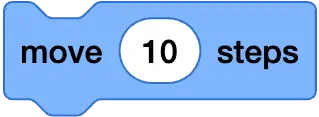
      An image in a quiz
      An image in a quiz
      Correct Answer: An image in a quiz
      An image in a quiz

      Q3.
      Which of these code blocks would make a sprite move slowly to a random position?

      An image in a quiz
      Correct Answer: An image in a quiz
      An image in a quiz

      Q4.
      Look at the Scratch project. If a movement block was added now, which sprite would move?
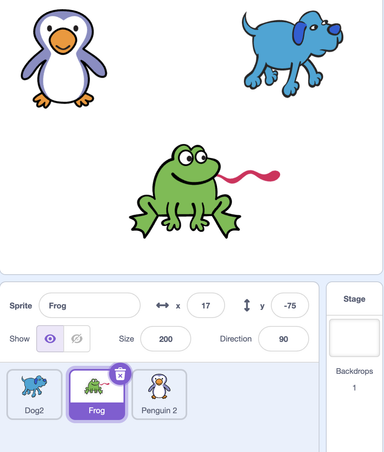
      An image in a quiz
      Dog
      Correct answer: Frog
      Penguin
      Q1 image 1 Scratch is a project of the Scratch Foundation. It is available for free at https://scratch.org. OR ScratchJr is a project of the Scratch Foundation. It is available for free at https://scratchjr.org. OR Scratch Foundation under CC BY-SA 2.0 Q1 image 2 Scratch is a project of the Scratch Foundation. It is available for free at https://scratch.org. OR ScratchJr is a project of the Scratch Foundation. It is available for free at https://scratchjr.org. OR Scratch Foundation under CC BY-SA 2.0 Q1 image 3 Scratch is a project of the Scratch Foundation. It is available for free at https://scratch.org. OR ScratchJr is a project of the Scratch Foundation. It is available for free at https://scratchjr.org. OR Scratch Foundation under CC BY-SA 2.0 Q2 image 1 Scratch is a project of the Scratch Foundation. It is available for free at https://scratch.org. OR ScratchJr is a project of the Scratch Foundation. It is available for free at https://scratchjr.org. OR Scratch Foundation under CC BY-SA 2.0 Q2 image 2 Scratch is a project of the Scratch Foundation. It is available for free at https://scratch.org. OR ScratchJr is a project of the Scratch Foundation. It is available for free at https://scratchjr.org. OR Scratch Foundation under CC BY-SA 2.0 Q2 image 3 Scratch is a project of the Scratch Foundation. It is available for free at https://scratch.org. OR ScratchJr is a project of the Scratch Foundation. It is available for free at https://scratchjr.org. OR Scratch Foundation under CC BY-SA 2.0 Q3 image 1 Scratch is a project of the Scratch Foundation. It is available for free at https://scratch.org. OR ScratchJr is a project of the Scratch Foundation. It is available for free at https://scratchjr.org. OR Scratch Foundation under CC BY-SA 2.0 Q3 image 2 Scratch is a project of the Scratch Foundation. It is available for free at https://scratch.org. OR ScratchJr is a project of the Scratch Foundation. It is available for free at https://scratchjr.org. OR Scratch Foundation under CC BY-SA 2.0 Q4 Scratch is a project of the Scratch Foundation. It is available for free at https://scratch.org. OR ScratchJr is a project of the Scratch Foundation. It is available for free at https://scratchjr.org. OR Scratch Foundation under CC BY-SA 2.0

      To help you plan your 3 computing lesson on: Programming sprites, download all teaching resources for free and adapt to suit your pupils' needs...