Choose exam board for KS4 Computer Science (GCSE)
Choose exam board for KS4 English
Choose exam board for KS4 French
Choose exam board for KS4 Geography
Choose exam board for KS4 German
Choose exam board for KS4 History
Choose tier for KS4 Maths
Choose exam board for KS4 Music
Choose exam board for KS4 Physical education (GCSE)
Choose exam board for KS4 Religious education (GCSE)
Choose exam board for KS4 Spanish

      Program a sprite to move around a maze

      Lesson details

      Learning outcome

      I can create a program to move a sprite in four directions.

      Key learning points

      1. A program can be written to move a sprite in four directions.
      2. The size of a sprite may need to be adjusted depending on the background.
      3. Algorithms can be translated into code.
      4. Code can be adapted by duplicating and changing the values.

      Keywords

      • Algorithm - a precise set of ordered steps which can be followed by a human or a computer to do a task

      • Sprite - a graphic object that can be controlled by a program

      • Duplicate - to copy an exact part of a coding project

      Common misconception

      The size of the sprite doesn't matter when programming movement.

      Sprite size is important, especially in a maze, as if the sprite is too big it will touch the walls.

      Teacher tip

      You should be familiar with the process of resizing sprites in Scratch, which is covered within the lesson. Modelling this action using the same software that pupils will use will help develop understanding of what to do.

      Equipment

      Pupils will need access to a device with block-based programming software. Examples in this lesson use Scratch https://oak.link/scratch

      Licence

      This content is © Oak National Academy Limited (2026), licensed on Open Government Licence version 3.0
      except where otherwise stated. See Oak's terms & conditions
      (Collection 2).

      Lesson video

      Loading...

      Prior knowledge starter quiz

      6 Questions

      Q1.
      Which block is needed to make a sprite move when you press a key?
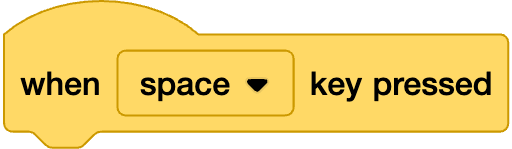
      Correct Answer: An image in a quiz
      An image in a quiz
      An image in a quiz

      Q2.
      What is the purpose of an algorithm?

      It makes a sprite look different.
      Correct answer: It gives a precise set of ordered steps to follow.
      It changes the background.

      Q3.
      What direction does a sprite move when it is set to 90 degrees in Scratch?

      Correct answer: right
      left
      up
      down

      Q4.
      What does the word resize mean?

      Correct answer: to change the size
      to change the colour
      to change the language

      Q5.
      A is a graphic object that can be controlled by a program.

      Correct Answer: sprite

      Q6.
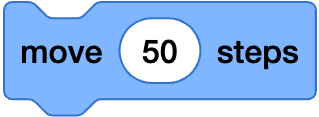
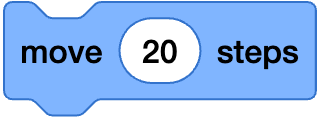
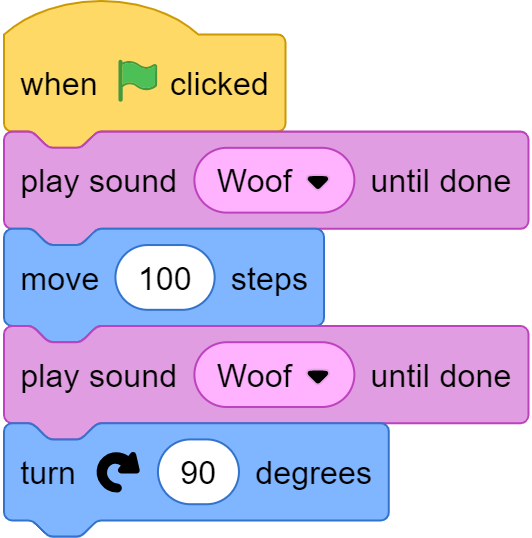
      Which movement block will make a sprite move the furthest?
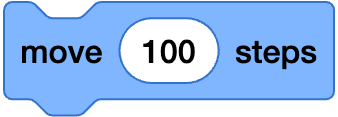
      Correct Answer: An image in a quiz
      An image in a quiz
      An image in a quiz
      An image in a quiz
      Q1 image 1 Scratch is a project of the Scratch Foundation. It is available for free at https://scratch.org. OR ScratchJr is a project of the Scratch Foundation. It is available for free at https://scratchjr.org. OR Scratch Foundation under CC BY-SA 2.0 Q1 image 2 Scratch is a project of the Scratch Foundation. It is available for free at https://scratch.org. OR ScratchJr is a project of the Scratch Foundation. It is available for free at https://scratchjr.org. OR Scratch Foundation under CC BY-SA 2.0 Q6 image 1 Scratch is a project of the Scratch Foundation. It is available for free at https://scratch.org. OR ScratchJr is a project of the Scratch Foundation. It is available for free at https://scratchjr.org. OR Scratch Foundation under CC BY-SA 2.0 Q6 image 2 Scratch is a project of the Scratch Foundation. It is available for free at https://scratch.org. OR ScratchJr is a project of the Scratch Foundation. It is available for free at https://scratchjr.org. OR Scratch Foundation under CC BY-SA 2.0 Q6 image 3 Scratch is a project of the Scratch Foundation. It is available for free at https://scratch.org. OR ScratchJr is a project of the Scratch Foundation. It is available for free at https://scratchjr.org. OR Scratch Foundation under CC BY-SA 2.0

      6 Questions

      Q1.
      Match the keywords to the definitions.

      Correct Answer:algorithm,ordered steps that a human or computer can follow to complete a task

      ordered steps that a human or computer can follow to complete a task

      Correct Answer:sprite,a graphic object that can be controlled by a program

      a graphic object that can be controlled by a program

      Correct Answer:duplicate,to copy an exact part of a coding project

      to copy an exact part of a coding project

      Q2.
      Why does the size of a sprite matter when programming movement in a maze game?

      Bigger sprites move faster.
      The size does not affect the movement at all.
      Correct answer: If the sprite is too big, it might touch the walls.

      Q3.
      Which block should you use to change the direction a sprite is facing?
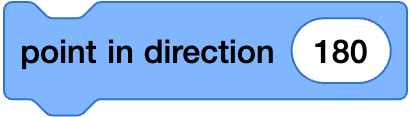
      Correct Answer: An image in a quiz
      An image in a quiz
      An image in a quiz
      An image in a quiz

      Q4.
      What is the tool that can save time when you have to create similar code?

      Correct Answer: duplicate, duplicat

      Q5.
      Which part of Scratch lets you change how the stage looks?

      Correct Answer: backdrop, back drop

      Q6.
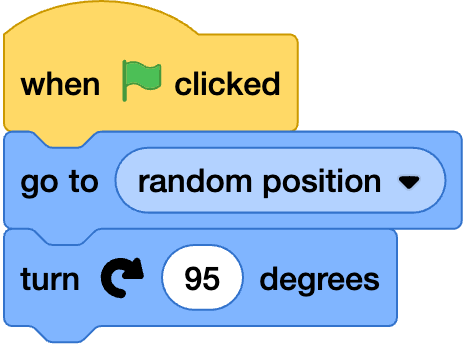
      Which code will let a sprite move down?
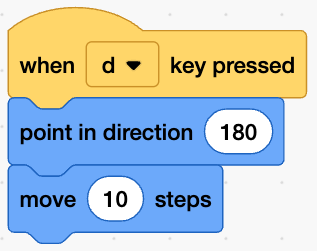
      Correct Answer: An image in a quiz
      An image in a quiz
      An image in a quiz
      An image in a quiz
      Q3 image 1 Scratch is a project of the Scratch Foundation. It is available for free at https://scratch.org. OR ScratchJr is a project of the Scratch Foundation. It is available for free at https://scratchjr.org. OR Scratch Foundation under CC BY-SA 2.0 Q3 image 2 Scratch is a project of the Scratch Foundation. It is available for free at https://scratch.org. OR ScratchJr is a project of the Scratch Foundation. It is available for free at https://scratchjr.org. OR Scratch Foundation under CC BY-SA 2.0 Q3 image 3 Scratch is a project of the Scratch Foundation. It is available for free at https://scratch.org. OR ScratchJr is a project of the Scratch Foundation. It is available for free at https://scratchjr.org. OR Scratch Foundation under CC BY-SA 2.0 Q6 image 1 Scratch is a project of the Scratch Foundation. It is available for free at https://scratch.org. OR ScratchJr is a project of the Scratch Foundation. It is available for free at https://scratchjr.org. OR Scratch Foundation under CC BY-SA 2.0 Q6 image 2 Scratch is a project of the Scratch Foundation. It is available for free at https://scratch.org. OR ScratchJr is a project of the Scratch Foundation. It is available for free at https://scratchjr.org. OR Scratch Foundation under CC BY-SA 2.0 Q6 image 3 Scratch is a project of the Scratch Foundation. It is available for free at https://scratch.org. OR ScratchJr is a project of the Scratch Foundation. It is available for free at https://scratchjr.org. OR Scratch Foundation under CC BY-SA 2.0

      To help you plan your 3 computing lesson on: Program a sprite to move around a maze, download all teaching resources for free and adapt to suit your pupils' needs...