


Choosing formatting tools



Lesson details
Learning outcome
I can make formatting changes and undo mistakes.
Key learning points
- Text styling tools make words stand out.
- Changes can be undone and redone.
Keywords
Appropriate - a choice that fits the design
Undo - to go back one step
Redo - goes forward again if you have used undo
Common misconception
Undo will restart your document from the very beginning.
Undo only removes the most recent change so you only need to go as far back as to where you made the mistake you want to correct.
Teacher tip
Pupils need access to the downloadable file template. Model to pupils how to find and open the resources, as this can differ between platforms.

Equipment
Pupils will need access to a device with word processing software. Examples in this lesson use Google Docs https://oak.link/google.docs

Files needed for this lesson
L5 Task A 427 KB (DOCX)
L5 Task B 78 KB (DOCX)
Download these files to use in the lesson.

Licence

Lesson video
Loading...
Prior knowledge starter quiz
4 Questions
Q1.This font button puts a line under the font you have selected.

Q2.In a word processor, what do you usually see on the toolbar?
Q3.What will happen when you select text?
Q4.When we talk about a text's style, what do we mean?
Assessment exit quiz
4 Questions
Q1.What can you change with this part of the toolbar?
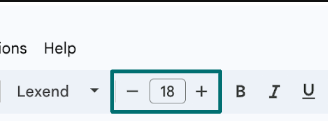
Q2.What do you have to do before you can change text formatting?
Q3.When we talk about formatting, what does an appropriate choice mean?
Q4.What does the undo button do?
To help you plan your 1 computing lesson on: Choosing formatting tools, download all teaching resources for free and adapt to suit your pupils' needs...
To help you plan your 1 computing lesson on: Choosing formatting tools, download all teaching resources for free and adapt to suit your pupils' needs.
The starter quiz will activate and check your pupils' prior knowledge, with versions available both with and without answers in PDF format.
We use learning cycles to break down learning into key concepts or ideas linked to the learning outcome. Each learning cycle features explanations with checks for understanding and practice tasks with feedback. All of this is found in our slide decks, ready for you to download and edit. The practice tasks are also available as printable worksheets and some lessons have additional materials with extra material you might need for teaching the lesson.
The assessment exit quiz will test your pupils' understanding of the key learning points.
Our video is a tool for planning, showing how other teachers might teach the lesson, offering helpful tips, modelled explanations and inspiration for your own delivery in the classroom. Plus, you can set it as homework or revision for pupils and keep their learning on track by sharing an online pupil version of this lesson.
Explore more key stage 1 computing lessons from the Digital writing unit, dive into the full primary computing curriculum, or learn more about lesson planning.