


Statistical summaries using technology



Lesson details
Learning outcome
I can use technology to effectively summarise and represent data.
Key learning points
- Technology can be used to calculate numerical summary statistics.
- Technology can be used to create visual representations of data.
- It is important to select appropriate representations and summaries based on context and the type of data.
Keywords
Statistical summary - A statistical summary sums up the features of a data set.
Common misconception
Spreadsheets should always be used for data analysis as they are perfect.
Spreadsheet software is incredibly powerful but care should be taken as human error can lead to incorrect results.
Teacher tip
This lesson requires pupils to use a device that can access the internet. They will be using sets of data provided. The data can be downloaded before the lesson and saved locally if preferred.

Licence

Lesson video
Loading...
Prior knowledge starter quiz
6 Questions
Q1.A __________ is a circular graph where sectors represent different groups proportionally.

Q2.Find the mode of the following numbers: 15, 13, 20, 15, 17, 16.
Q3.Find the median of the following numbers: 15, 13, 20, 15, 17, 16.
Q4.Find the range of the following numbers: 15, 13, 20, 15, 17, 16.
Q5.Find the mean of the following numbers: 15, 13, 20, 15, 17, 16.
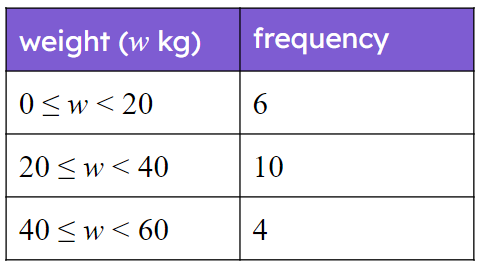
Q6.An estimate for the mean of the data presented in the table is kilograms.
Assessment exit quiz
6 Questions
Q1.A __________ sums up the features of a data set.
Q2.When using spreadsheet software, which command would calculate the mean for a column of numerical data?
Q3.When using spreadsheet software, which command would calculate the range for a column of numerical data?
Q4.When using spreadsheet software, which command would calculate the median for a column of numerical data?
Q5.When using spreadsheet software, what symbol represents multiplication?
Q6.When using spreadsheet software, what symbol represents division?
To help you plan your 10 maths lesson on: Statistical summaries using technology, download all teaching resources for free and adapt to suit your pupils' needs...
To help you plan your 10 maths lesson on: Statistical summaries using technology, download all teaching resources for free and adapt to suit your pupils' needs.
The starter quiz will activate and check your pupils' prior knowledge, with versions available both with and without answers in PDF format.
We use learning cycles to break down learning into key concepts or ideas linked to the learning outcome. Each learning cycle features explanations with checks for understanding and practice tasks with feedback. All of this is found in our slide decks, ready for you to download and edit. The practice tasks are also available as printable worksheets and some lessons have additional materials with extra material you might need for teaching the lesson.
The assessment exit quiz will test your pupils' understanding of the key learning points.
Our video is a tool for planning, showing how other teachers might teach the lesson, offering helpful tips, modelled explanations and inspiration for your own delivery in the classroom. Plus, you can set it as homework or revision for pupils and keep their learning on track by sharing an online pupil version of this lesson.
Explore more key stage 4 maths lessons from the Comparisons of numerical summaries of data unit, dive into the full secondary maths curriculum, or learn more about lesson planning.