


Mastering 3D sketching


Lesson details
Learning outcome
I can render a complex shape and add annotation.
Key learning points
- Rendering can be used to enhance complex shapes.
- Annotation using subheadings can be used to analyse products.
Keywords
Render - to add details like shading, texture, and depth to a drawing to make it appear more realistic
Annotation - a comment added to a diagram or image to provide explanation, clarification, or extra information
Tone - the lightness or darkness of an area, which helps create a sense of dimension in the image
Texture - how something feels or looks like it would feel if touched
Common misconception
Annotations can replace the need for a clear and accurate sketch.
Annotation provides further explanation or clarification on what is not visible in the sketch.
Teacher tip
Annotating live in front of the pupils is a great way to exemplify the process of annotating a sketch. This could be done using a visuliser or on a white board.

Equipment
pencil, rubber, ruler, pencil crayons

Licence

Lesson video
Loading...
Prior knowledge starter quiz
6 Questions
Q1.Rendering should consider the tone, depth and ...

Q2.Adding texture to a sketched object can help to show whether an object is ...
Q3.The sketch below has been rendered to represent which material?
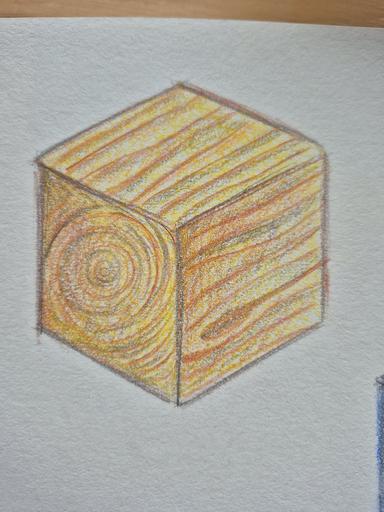
Q4.Put the timber rendering process in order.
Q5.What is annotation?
Q6.Which technique can be used to aid sketching complex shapes?
Assessment exit quiz
6 Questions
Q1.Which technique does this image show?
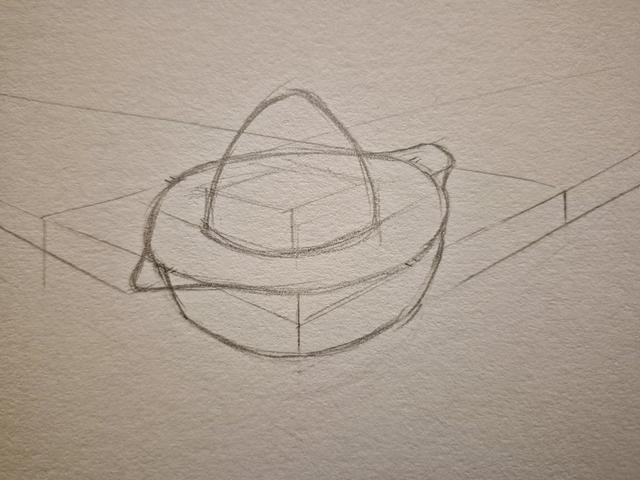
Q2.Using the crating technique to sketch complex shapes can help to plan out the size, shape and ...
Q3.What can be added to a sketch when not all the information can be shown through sketching alone?
Q4.Why are subheadings used when annotating sketches?
Q5.What subheadings could you include in your annotation if you were trying to explain how your design fits the user?
Q6.Put the stages of sketching and rendering a complex shape in the correct order.
To help you plan your 10 design and technology lesson on: Mastering 3D sketching, download all teaching resources for free and adapt to suit your pupils' needs...
To help you plan your 10 design and technology lesson on: Mastering 3D sketching, download all teaching resources for free and adapt to suit your pupils' needs.
The starter quiz will activate and check your pupils' prior knowledge, with versions available both with and without answers in PDF format.
We use learning cycles to break down learning into key concepts or ideas linked to the learning outcome. Each learning cycle features explanations with checks for understanding and practice tasks with feedback. All of this is found in our slide decks, ready for you to download and edit. The practice tasks are also available as printable worksheets and some lessons have additional materials with extra material you might need for teaching the lesson.
The assessment exit quiz will test your pupils' understanding of the key learning points.
Our video is a tool for planning, showing how other teachers might teach the lesson, offering helpful tips, modelled explanations and inspiration for your own delivery in the classroom. Plus, you can set it as homework or revision for pupils and keep their learning on track by sharing an online pupil version of this lesson.
Explore more key stage 4 design and technology lessons from the Product analysis: encouraging healthy lifestyles unit, dive into the full secondary design and technology curriculum, or learn more about lesson planning.